Android users, wait is over now, IRCTC has launched an app for android platform called, the IRCTC connect. The app is already available Google Play Store for download.
Features of IRCTC Connect
One step login.
Search trains.
Book, view and cancel tickets.
New user registration.
Retention of passenger data.
Rail ticketing now made simpler just by SWIPE and SHUFFLE, SELECT and
BOOK. Install the newly launched IRCTC android app and book a railway
ticket anywhere in India at your fingertips. description at playstore
This app is compatible with Android 4.1 and above. Download APP.
Are you in College ? Or, you have to travel frequently ? Do you take risks of booking a waitlisted ticket ?
If your answer is yes to any of the above questions, here's a tool with which you can predict, whether you would get a confirmed ticket or not. According to the developer, ticket confirmations follow certain trends. Before boarding your train, you can also check the status on Android devices as well with their ConfirmTkt app or through their website Confirmtkt.
Developer says
“We personally experienced the difficulties of getting a train ticket to travel to our native places. Whenever we try to book a ticket it would show waiting list. We used to book tickets by analyzing the past trends manually. So we thought why can’t we build something which can analyze and tell you whether to book or not.”
ConfirmTkt predicts the future status of PNR’s in seconds based on historical trends. It also assists you in deciding whether to book or not if the train is in waitlist.
Confirmtkt allows you to
Predict your ticket confirmation chances if you have a waitlist ticket.
PNR status check.
Subscribe for the PNR confirmation notifications.
Search trains between a desired source and destination pair.
Compare all the ticket confirmation chances for the trains on a single screen and decide on the travel options.
According to developers,
All you need is a valid PNR. Enter the PNR and click ‘Get status’ button to get all your PNR information instantly. ConfirmTkt shows the ticket confirmation chances with in a fraction of seconds. Once you have finished your PNR status check, if your ticket is in waitlist/ RAC and you want to be notified when your ticket gets confirmed. Then just enter a valid email ID to subscribe for PNR confirmation notification we handle the rest. Once your PNR gets confirmed they will send you an email notification with the detailed PNR information.
ConfirmTkt prediction algorithm has been thoroughly tested on about 2500 trains and achieved an overall accuracy of 88%. It took them 2 years to develop an algorithm with such an accuracy. “Do not worry about the accuracy, we will take care of it,” they say. The ticket confirmation chances may vary from a holiday/weekend to a normal day. As a result this 2 person team maintains ticketing trends for holidays /weekends separately and predict accuracy based on that.
If the confirmation chances are above 70% then they interpret it as ‘Confirm’
If the confirmation chances are between 30% and 70% then they interpret as ‘Probable’
Anything below 30 % is interpreted as ‘No Chance’.
As a message for future entrepreneurs, they said “Don’t be afraid to take risk. If you want to solve some problem that nobody else dared to solve and are passionate about it then just do it.”
There are lots of cloud storage providers and most offer free storage plans. Use CloudGOO to connect cloud drives and create one big space for you to use. Create bunches of space for free and save money. No need to use many different apps to get to all your stuff.
There's lots of free cloud storage.Connect it, use it, and save money with cloudGOO.
Think big. Create space for free. Example: OneDrive (7GB) + Dropbox (2GB) + Google Drive (15GB) + Amazon CloudDrive (5GB) + Box (10GB) = 39GB - for free!
Be in control. One app, not many.
cloudGOO gives you one easy way to manage and access your stuff, no matter where it's stored. No need to use many different apps to get to all your stuff - simplify your life and use just one.
Move and copy stuff between drives. Automatically upload stuff to your drives. Search across all your drives. Lots of features to make it simple to use cloud storage and put you in control.
Use your stuff. Have fun.
It's your stuff in the cloud. Worry less about where it is and just get to it easily with cloudGOO. Start using your stuff in the cloud, the way you like to, no matter where it all is.
Which Cloud Drive Service Providers are suppported ? First version of cloudGOO will support (in no particular order), Google Drive, SkyDrive, Amazon Cloud Drive, Drop Box, Box, and Sugar Sync, and iCloud (on iPhone). More cloud drive providers will be supported as they develop cloudGOO in future versions.
Many a times you want to message your friend, make a reply, post photos etc. and you're bored of unlocking your phone each and every 5 mins. so here's an app for ANDROID users.
Connect with your friends right on your lock screen. Leave notes, drawings and photos for them to see when they switch on their phones.
HOW IT WORKS:
LokLok replaces your standard lock screen with a shared white board that is always in sync between you and whoever you are connected to. When you connect with one or more people your lock screens become synchronised. You will all see the same screen every time you switch on your phones. Whatever one of you does on that screen is updated on everyone else’s phone immediately and silently.
• Grab your phone and it’s there, start drawing without unlocking your phone • Leave a note for others, it’s the first thing they’ll see when they reach for their phone • Use it with your significant other or a group of close friends and stay in touch throughout the day • Works like a white board, erase what’s there or draw over it • Take a photo to put on your friend’s screen and draw over the photos they take • Share your images on social media • Groups are completely private, nobody can see you or search for you • No history is saved, once you erase it it’s gone
When you install the app, it replaces your standard lock screen with a new one where you can draw and place photos. If you invite a friend or accept someone’s invitation, both your lock screens become synchronised, so whenever one of you draws the other person’s phone is instantly updated.
How do I invite my friends?
You can send them an invite from the app by typing an email address or selecting one from your contacts. Please note that LokLok uses the google account from your Android phone, so you should send your invites to your friend’s google email address. As an alternative, you can link your facebook account to find friends who are already using LokLok.
Can I use it as a Widget?
Yes, you can. You can also disable the lock screen from the app settings, but you probably won’t see when other people update it.
Can I use it on my tablet?
Yes, you can.
Can I use photos from my gallery?
Yes, any app that lets you share an image with other apps in your phone will allow you to place the photo on LokLok.
Can I be in more than one group?
Yes, you can be in up to 3 different groups.
Sometimes I see my old lock screen for a moment before LokLok shows up, why is that?
Android imposes some restrictions – mainly for security reasons – on how apps can replace the standard lock screen. Sometimes it prevents LokLok from displaying immediately, like right after you’ve pressed the home button. They’re working hard on finding a solution and we’re hoping that upcoming versions of Android offer an alternative.
Where are the images uploaded to?
They’re uploaded to loklok's server so they can synchronise it with the people in your group. They only keep the latest image on each group, so if you want to delete it from our servers you just have to clear your screen.
LokLok takes full advantage of Android’s possibilities for customisation. Apple has a strict policy and doesn’t allow any apps to take over the phone’s lock screen. They are currently working on an iPhone version of LokLok, which will be slightly different but cool anyway. They will announce the release date soon.
There are lots of cloud storage providers and most offer free storage plans. Use CloudGOO to connect cloud drives and create one big space for you to use. Create bunches of space for free and save money. No need to use many different apps to get to all your stuff.
There's lots of free cloud storage.Connect it, use it, and save money with cloudGOO.
Think big. Create space for free. Example: OneDrive (7GB) + Dropbox (2GB) + Google Drive (15GB) + Amazon CloudDrive (5GB) + Box (10GB) = 39GB - for free!
Be in control. One app, not many.
cloudGOO gives you one easy way to manage and access your stuff, no matter where it's stored. No need to use many different apps to get to all your stuff - simplify your life and use just one.
Move and copy stuff between drives. Automatically upload stuff to your drives. Search across all your drives. Lots of features to make it simple to use cloud storage and put you in control.
Use your stuff. Have fun.
It's your stuff in the cloud. Worry less about where it is and just get to it easily with cloudGOO. Start using your stuff in the cloud, the way you like to, no matter where it all is.
Which Cloud Drive Service Providers are suppported ? First version of cloudGOO will support (in no particular order), Google Drive, SkyDrive, Amazon Cloud Drive, Drop Box, Box, and Sugar Sync, and iCloud (on iPhone). More cloud drive providers will be supported as they develop cloudGOO in future versions.
Many a times you want to message your friend, make a reply, post photos etc. and you're bored of unlocking your phone each and every 5 mins. so here's an app for ANDROID users.
Connect with your friends right on your lock screen. Leave notes, drawings and photos for them to see when they switch on their phones.
HOW IT WORKS:
LokLok replaces your standard lock screen with a shared white board that is always in sync between you and whoever you are connected to.
When you connect with one or more people your lock screens become synchronised. You will all see the same screen every time you switch on your phones. Whatever one of you does on that screen is updated on everyone else’s phone immediately and silently.
• Grab your phone and it’s there, start drawing without unlocking your phone
• Leave a note for others, it’s the first thing they’ll see when they reach for their phone
• Use it with your significant other or a group of close friends and stay in touch throughout the day
• Works like a white board, erase what’s there or draw over it
• Take a photo to put on your friend’s screen and draw over the photos they take
• Share your images on social media
• Groups are completely private, nobody can see you or search for you
• No history is saved, once you erase it it’s gone
When you install the app, it replaces your standard lock screen with a new one where you can draw and place photos. If you invite a friend or accept someone’s invitation, both your lock screens become synchronised, so whenever one of you draws the other person’s phone is instantly updated.
How do I invite my friends?
You can send them an invite from the app by typing an email address or selecting one from your contacts. Please note that LokLok uses the google account from your Android phone, so you should send your invites to your friend’s google email address. As an alternative, you can link your facebook account to find friends who are already using LokLok.
Can I use it as a Widget?
Yes, you can. You can also disable the lock screen from the app settings, but you probably won’t see when other people update it.
Can I use it on my tablet?
Yes, you can.
Can I use photos from my gallery?
Yes, any app that lets you share an image with other apps in your phone will allow you to place the photo on LokLok.
Can I be in more than one group?
Yes, you can be in up to 3 different groups.
Sometimes I see my old lock screen for a moment before LokLok shows up, why is that?
Android imposes some restrictions – mainly for security reasons – on how apps can replace the standard lock screen. Sometimes it prevents LokLok from displaying immediately, like right after you’ve pressed the home button. They’re working hard on finding a solution and we’re hoping that upcoming versions of Android offer an alternative.
Where are the images uploaded to?
They’re uploaded to loklok's server so they can synchronise it with the people in your group. They only keep the latest image on each group, so if you want to delete it from our servers you just have to clear your screen.
LokLok takes full advantage of Android’s possibilities for customisation. Apple has a strict policy and doesn’t allow any apps to take over the phone’s lock screen. They are currently working on an iPhone version of LokLok, which will be slightly different but cool anyway. They will announce the release date soon.
When your child first learned to ride a bike, did you simply put her on a two-wheeler and let her go?
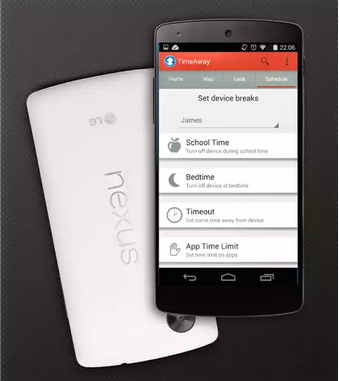
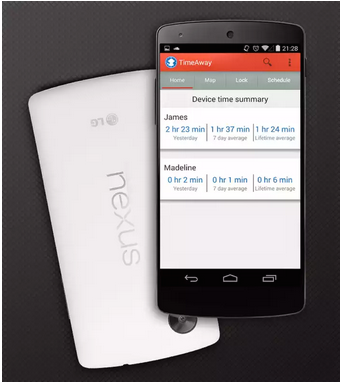
Probably not. It was a process, moving from a tricycle to training wheels to a two-wheeler. You were on the sidelines coaching her through the entire process. It's the same with TimeAway. This app lets you put boundaries on the internet, so your kid can gradually learn to become a responsible citizen of the internet.
Children spend approximately five days a week using mobile devices such as a smartphone, tablet or iPod Touch, with an average session generally lasting just under one hour.
I think as children get older and have their own devices, they spend even longer on their devices. It's the perfect solution for your kid's first tablet or phone.
After installing TimeAway on both the parent and child phones / tablets, you can remotely:
All Android phones already come with Safety Search under Google Settings ---> Search & Now --> Accounts & Privacy --> SafeSearch Filter. They recommend you select the "Safe Search" filter and block the app "Google Settings," so your kid can not change the settings.
Can my kid remove TimeAway from his phone?
No, the TimeAway app can not be removed without the parent password.
What happens if my kid gets a new phone?
You can disable the old phone by clicking on the three dots in the upper right hand corner & then selecting "Manage Kids". The old account will be disabled. You will then need to install TimeAway on the new phone under a different variation of the name (i.e., Kate New).
Will any apps always stay on regardless of time limits?
Yes, you can set apps useful like Wikipedia, Calculator & Google Maps to "always be on." In addition, the phone will never be blocked for safety reasons.
You could contact the developer if you want to give any suggestions. Want to hear from you all, comment below.
When your child first learned to ride a bike, did you simply put her on a two-wheeler and let her go?
Probably not. It was a process, moving from a tricycle to training wheels to a two-wheeler. You were on the sidelines coaching her through the entire process. It's the same with TimeAway. This app lets you put boundaries on the internet, so your kid can gradually learn to become a responsible citizen of the internet.
Children spend approximately five days a week using mobile devices such as a smartphone, tablet or iPod Touch, with an average session generally lasting just under one hour.
I think as children get older and have their own devices, they spend even longer on their devices.
It's the perfect solution for your kid's first tablet or phone.
After installing TimeAway on both the parent and child phones / tablets, you can remotely:
All Android phones already come with Safety Search under Google Settings ---> Search & Now --> Accounts & Privacy --> SafeSearch Filter. They recommend you select the "Safe Search" filter and block the app "Google Settings," so your kid can not change the settings.
Can my kid remove TimeAway from his phone?
No, the TimeAway app can not be removed without the parent password.
What happens if my kid gets a new phone?
You can disable the old phone by clicking on the three dots in the upper right hand corner & then selecting "Manage Kids". The old account will be disabled. You will then need to install TimeAway on the new phone under a different variation of the name (i.e., Kate New).
Will any apps always stay on regardless of time limits?
Yes, you can set apps useful like Wikipedia, Calculator & Google Maps to "always be on." In addition, the phone will never be blocked for safety reasons.
You could contact the developer if you want to give any suggestions. Want to hear from you all, comment below.
If you're unable to see images, *.blogspot.com may be blocked in your region. Our images are hosted on blogger platform. So, if you want to see images too, you can use proxy.







.jpg)
